Updated: Jun 5, 2012
Found in: Photography, Albums, Share, Photos
Requirements: Require Android 2.2 and up
Downloads: 2
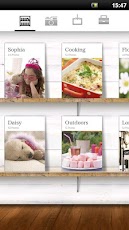
The million moments application makes it easy to create elegantly laid out albums of your cherished pictures with just a few taps. Give your years of picturesyour growing children, your travels, your favorite momentsa sophisticated presentation. No expertise required!
This app is developed by Sony Digital Network Applications, Inc. (SDNA)
Overview:
-Create albums without editing your images Import the pictures from your smartphone or your Facebook albums, or take new pictures from within million moments to create an album automatically. Imported pictures are automatically sorted by date, with one-to-five pictures displayed per page.
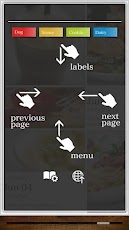
- Create new albums by attaching labels Attaching new labels to images automatically creates new albums corresponding to the labels. For example, create a label for your childs name and attach it to pictures of your child, and youll automatically have an album named for your child containing those pictures.
- Easy picture sharing is built in
million moments can post a page of an album to Facebook.
Permissions:
Full internet access
- To upload/download pictures to Facebook
modify/delete USB storage contents
modify/delete SD card contents
- To read pictures
- To save cache data
For more information, please refer to:
http://www.sonydna.com/sdna/e/products/millionmoments/index.html
million moments blog:
http://www.sonydna.com/sdna/e/products/pr_mm/m/blog/index.html
Photo and Video Solution From SDNA:
http://www.sonydna.com/sdna/products/pr_pv/index.html/
SDNA Facebook Page:
http://www.facebook.com/sonydna



Barcode download
- Open your preferred Barcode scanner software
(Do not have barcode app? Get one here or more on the barcode page). - Point your phone camera at the QR code below and scan it.
- Follow the onscreen instructions to proceed with the installation.

Via: million moments


0 comments:
Post a Comment